What is the MCP?
We are starting to see a shift from how people find information. If you wanted to learn more about a topic, you would start by typing into Google a few keywords on the topic you were interested, then click onto the site that was most relevant to you. With AI applications, the way we typically find information is with a prompt in Claude, Copilot, Gemini - whatever AI application you use, then you get your response. This is useful, but has since progressed, retrieval-based prompts are great for finding out information but never actually do anything. Ultimately the AI application you are using, is limited in its ability and access to information and actions that it can do. Without providing context, it has the underlying large language model (LLM) and the internet to find out the information you need. This is sufficient for tasks for planning an itinerary, researching a topic, finding a good recipe for butter chicken (KFI butter chicken sauce from Costco is great, I just use that FWIW). But now, you probably find yourself wanting to extend this out to prompts that actually do things for you, i.e. action-based prompts.
This is where Model Context Protocol (MCP) comes in. The MCP is an open-source framework developed by Anthropic to standardize the integration of AI systems that you use (e.g. ChatGPT, Claude, or Copilot) with tools, knowledge sources and workflows. So MCP is the standard, and this is put in practice via connectors, which allows your AI application to access your apps and services. We will dive deeper into the MCP at an architectural level later on, but lets first wrap our heads around what a connector does.
I’ll continue the explanation of the MCP with the example of someone interacting with Claude to help them manage their inbox with Gmail. Suppose we have a full inbox with a bunch of unread emails, some emails we need to respond to, long threads that we want to get up to speed with and others we can safely ignore.
Without Claude, we would look at each of the emails, judge accordingly, then take the necessary action (respond, move to a folder, ignore, etc.). For more consistent emails you may get, there may have been some automations you have set (e.g. rules to auto-forward an email or move it to a folder based on subject line). One thing I want to highlight that seems to be forgotten is automations used to exist before AI applications were in production, it’s just that, they were only useful when the trigger was well-defined (I don’t want to get on a huge sidetrack - agents are awesome - and extremely useful, but automating something does NOT make it an agent!!).
With Claude, I can copy and paste the long email threads into Claude, and with a prompt, I can get a summary and a suggestion on what a draft to the email should be. Then, I could copy and paste it into my email client (e.g gmail) and send it. Useful, but this interaction with Claude didn’t output anything besides text. This is where connectors come in. By setting up a connector between Claude and my client, with a prompt such as:
Read my inbox, give me a summary of the most important/urgent emails and create drafts for me where a response is needed.
Based on the contents of the email (direct mentions of you, requests, etc.), Claude will review your inbox, give you a summary telling you what is important, determine which emails require a draft, and based on that determination, create the drafts for you.
This is just one of many examples of using connectors, As a user, there isn’t much consideration when setting up these connectors, in most cases it is just a click of a button. Setting things up, can be a little complicated however. In the example above, there were a few things that Claude did:
- Get email messages
- Get email threads
- Draft responses
Let’s formalize these two into tools we will arbitrarily define:
- get_email_messages()
- get_email_threads()
- draft_email_response()
Individually, these tools will need to connect to Google’s API, written, tested and maintained. This is three examples of tools, you can extrapolate the number of services Google offers, and the number of tools that would need to be authored for each action.
With MCP, we can instead move the tool definitions and utilization of said tools, to dedicated MCP servers instead of our own servers. We no longer have to define the tools!
Following a client-server architecture, we will define the following terms (for more info see Architecture Overview of MCP):
- MCP Server: A program that provides context to MCP clients
- MCP Client: An interface that connects to an MCP server and retrieves context from that server
- MCP Host: An AI application (e.g. Claude Code) that is actually managing an MCP client(s).
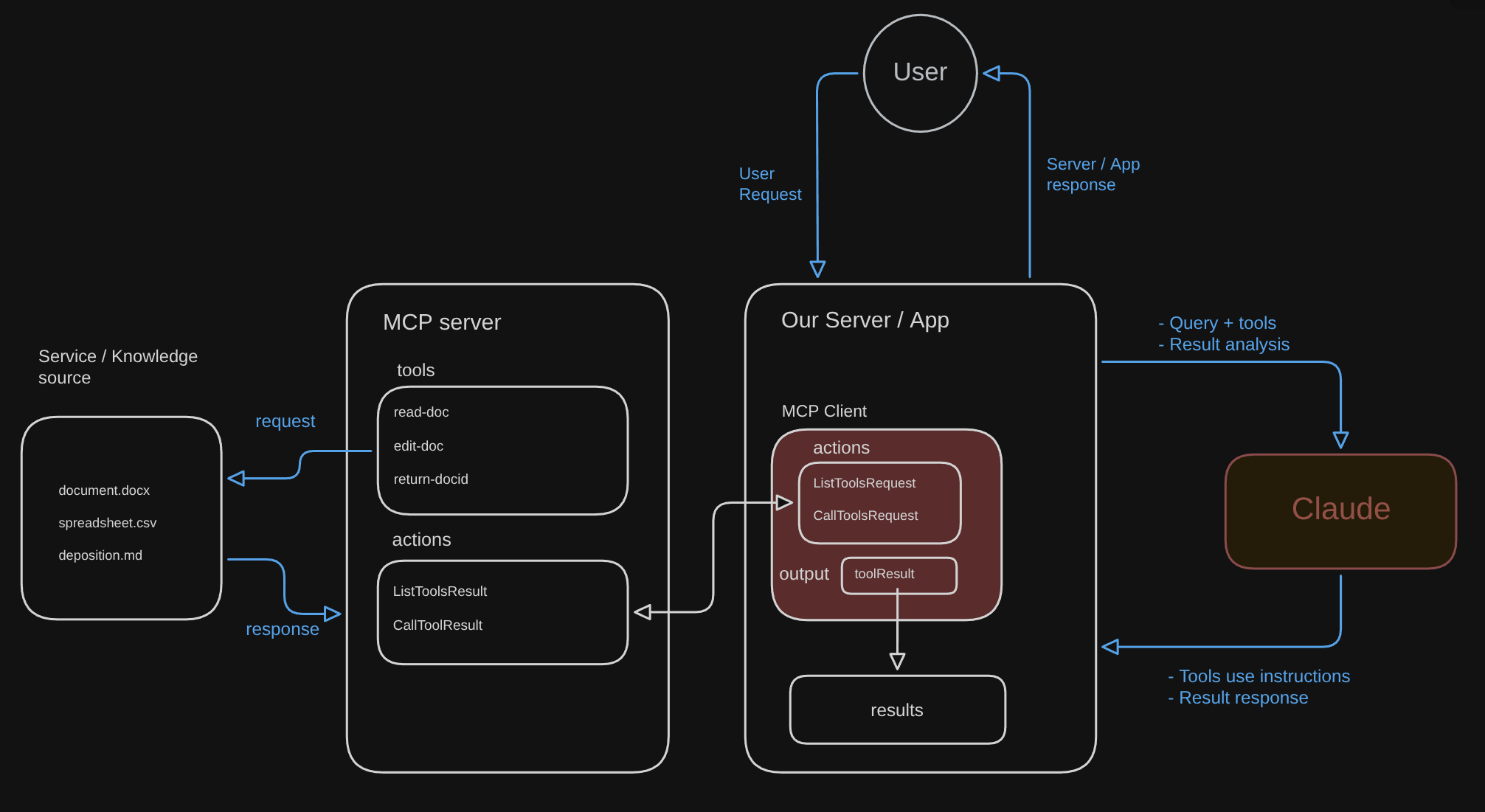
Returning to our previous example, you are in Claude, and you ask it the same prompt as before: to read & summarize your inbox, then create drafts. With MCP, Claude (the host) will create an MCP client, that will connect to the MCP server that Google makes available on their end. MCP servers can also be stored locally, where it lives doesn’t really matter, as long as it serves context data and tools. Based on a user request to our server / application, that will instruct Claude to instantiate the MCP client. There will now be an exchange of data between the MCP Client and the exposed MCP server. In this case, the MCP server will have a list of definitions, tool schemas, and access to the knowledge, that the MCP client will ask about. An example exchange would be
- User prompts Claude (or another AI application) to retrieve emails, summarize them and draft replies
- Claude establishes an MCP client which connects to the Google MCP server
- Transport mechanism is established between MCP client & MCP server(HTTP POST, authenticated with OAuth)
- MCP client asks for the tools that are available
- MCP server provides the list of tools that are available to the MCP client
- MCP client in our server tells Claude “You can read emails and create drafts”
- Claude provides our server + MCP client with the tools to use to ask the Google MCP server, which then pulls the necessary knowledge and preforms actions
- The output is shared with our MCP client, which then shares with Claude
- The user receives a response from Claude with the result e.g. here is the summary, and the drafts are ready to go
Anthropic’s Introduction to Model Context Protocol course has a really good video to see an example of this. I recommend checking it out here: MCP Clients
This is my attempt at getting a diagram, this is of course, a snapshot of the protocol in one of many applications, but it maybe useful to get an idea of what the interactions look like between all the different components of the MCP.